How To Use Git in Eclipse

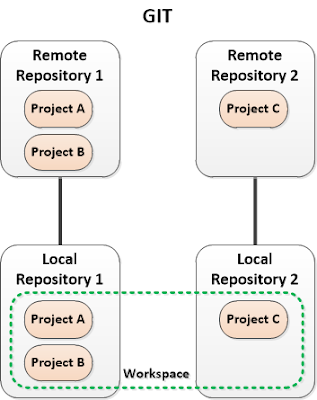
Version control is one of important things that you should consider when you work as a team with some people in a project development. In software development, there are some version control tools that can maintain application source codes such as Git and SVN. Main different between them is the use of local repository. SVN doesn't use any local repository so every committed changes will be stored directly to and maintain by remote SVN server. But, when you use Git, you must create local repository first. Pictures below show you the difference.
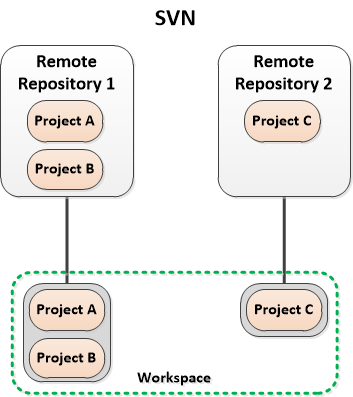
SVN scheme
Git scheme

You can use Git with some tools such as command line tools and desktop client applications. In this post, I will only show you how to use Git with Eclipse.


Set Up Remote Repository on GitHub

There are many Git repository service providers such as GitHub, Sourceforge, BitBucket, etc. But, I will use GitHub as example.
  • Create new account on GitHub.
  • Create new repository on GitHub. As a free member, you only can make public repositories. In this example, my repository name is "test".
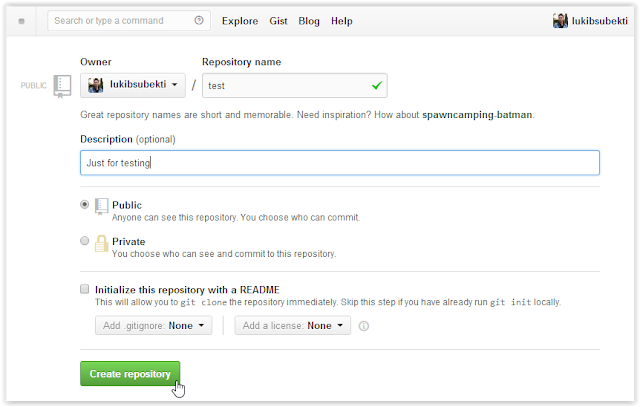
Create new repository
  • Copy your Git repository address. For example, my repository address is "https://github.com/lukibsubekti/test.git".
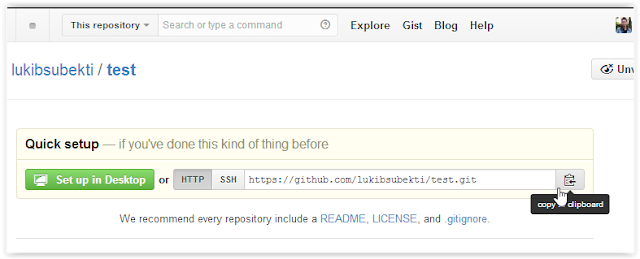
Copy repository location

Install EGit in Eclipse

Some Eclipse distributions have installed Git tools. But if there's no Git tools in your Eclipse, you can use EGit plugin.
  • Choose Install New Software on Eclipse.
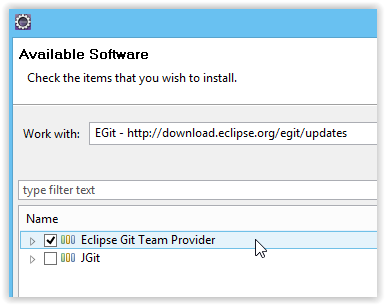
  • Set software repository location to "http://download.eclipse.org/egit/updates".
  • Install "Eclipse Git Team Provider".
Install EGit

Create Local Repository, Commit Changes, and Push to Remote Repository

  • Create a new project in Eclipse. For example, I create a PHP project named "project_A" and use "D:\Web Projects\project_A" as project directory.
Create new project
  • Right click on project_A folder in Eclipse. Choose Team --> Share Project --> Git.
  • Create local repository. I use "D:\git\test" as the location.
Create local repository
  • NOTE: In Eclipse, it's recommended that you don't create local repository inside your project directory because it can make Eclipse project load process to be longer.
  • Finally, in my work, Eclipse use "D:\git\test\.git" as local repository directory (outside the project_A  project directory) and move project_A project directory to "D:\git\test\project_A".
  • Try to create new file on your project. You can use "Git Staging" panel to see all current changes which has not yet committed (unstaged changes).
  • Right click  on project_A folder in Eclipse. Choose Team --> Commit.
  • Insert your comment and select all files to be committed to repository. If you choose "Commit", your changes will be only on local repository. You should choose "Commit and Push" to make it available on remote repository.
Commit changes
  • Set up push configuration.
Push to remote repository
Push ref specification
  • Now, your repository will be available on GitHub.
Remote repository on GitHub

Clone Project from Remote Repository

For this tutorial, I have built another project named project_X and stored it in GitHub repository. I have no local copy of this project. So, I must clone the project from GitHub first.
  • For example, the project is in remote repository at "https://github.com/lukibsubekti/test2.git".
  • In Eclipse, choose File --> Import --> Project from Git --> Clone URI. This step will create local repositry. I place the local repository in "D:\git\test2\.git".
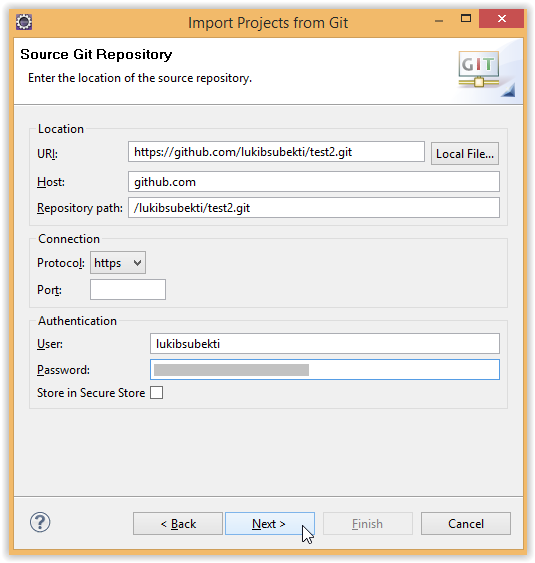
Clone from remote repository
  • Because project_X in the repository is an Eclipse project, you can choose "Import existing project" in wizard for project import. It will create a project and place it in "D:\git\test2\project_X". 
  • If there's no project configuration file (or other IDE configuration files) in remote repository, you can choose "New project wizard". If you choose new project wizard, at project creation section, you must choose project directory which has been created in local repository directory (eg. "D:\git\test3\project_name" not "D:\Web Projects\project_name").
  • Now you have local repository and the project.
You can get more tutorials from Vogella or Eclipse Wiki.

Comments

Popular posts from this blog

Deploying a Web Server on UpCloud using Terraform Modules

In my earlier post , I shared an example of deploying UpCloud infrastructure using Terraform from scratch. In this post, I want to share how to deploy the infrastructure using available Terraform modules to speed up the set-up process, especially for common use cases like preparing a web server. For instance, our need is to deploy a website with some conditions as follows. The website can be accessed through HTTPS. If the request is HTTP, it will be redirected to HTTPS. There are 2 domains, web1.yourdomain.com and web2.yourdomain.com . But, users should be redirected to "web2" if they are visiting "web1". There are 4 main modules that we need to set up the environment. Private network. It allows the load balancer to connect with the server and pass the traffic. Server. It is used to host the website. Load balancer. It includes backend and frontend configuration. Dynamic certificate. It is requ...

Increase of Malicious Activities and Implementation of reCaptcha

In recent time, I've seen the increase of malicious activities such as login attempts or phishing emails to some accounts I manage. Let me list some of them and the actions taken. SSH Access Attempts This happened on a server that host a Gitlab server. Because of this case, I started to limit the incoming traffic to the server using internal and cloud firewall provided by the cloud provider. I limit the exposed ports, connected network interfaces, and allowed protocols. Phishing Attempts This typically happened through email and messaging platform such as Whatsapp and Facebook Page messaging. The malicious actors tried to share a suspicious link lured as invoice, support ticket, or something else. Malicious links shared Spammy Bot The actors leverage one of public endpoint on my website to send emails. Actually, the emails won't be forwarded anywhere except to my own email so this just full my inbox. This bot is quite active, but I'm still not sure what...

How To Discover Exposed Digital Assets for Free Using Noxtara

If you have a website or public-facing digital assets, you might wonder whether they’re secure and what potential entry points could be at risk. A great first step is to list all the digital assets connected to your main domain. One free tool that can help with this is called Noxtara. It offers a variety of security tools in one integrated dashboard, including a feature for discovering public-facing assets. Creating a free account is simple—just head over to the registration page . If you’ve got a company email that matches the domain you want to scan, it’s best to use that since it makes adding the domain to the Noxtara platform much easier. No worries if you don’t have a company email, though; you can still sign up without a problem. Just keep in mind that when you want to add your company’s domain for scanning, you’ll need to go through a quick DNS record check. Registration Once you’ve registered, you can set up a team and add your domain in the team settings. If the domai...

My Review for Free Project Management Tools

For about a year I had used Trello  as my team project management tool. It helps my team to maintain our "to-do" lists. But after increasing project numbers, as operation manager, I feel hard to maintain each of the team jobs on some projects. Some tasks become untouched. After a meeting, our team realizes that what the team need is clear detail about "What should I do today?" or "What should my teammates do today?". We need to find another project management tool. Trello uses the Kanban scheme which is very adaptive. I feel it's not suitable for my team, which consists of some people with different levels of expertise and who work on multiple projects. We need a tool that is better for a more prescriptive process to maintain our projects. Other features of the project management tool that we need are free, simple, secure, fast, and has mobile support. First, I search on Google for "Best Free Project Management Tool". After that, I decided...

What's Good About Strapi, a Headless CMS

Recently, I've been revisiting Strapi as a solution for building backend systems. I still think this headless CMS can be quite useful in certain cases, especially for faster prototyping or creating common websites like company profiles or e-commerce platforms . It might even have the potential to handle more complex systems. With the release of version 5, I'm curious to know what updates it brings. Strapi has launched a new documentation page, and it already feels like an improvement in navigation and content structure compared to the previous version. That said, there's still room for improvement, particularly when it comes to use cases and best practices for working with Strapi. In my opinion, Strapi stands out with some compelling features that could catch developers' attention. I believe three key aspects of Strapi offer notable advantages. First, the content-type builder feature lets us design the data structure of an entity or database model , including ...

Manage Kubernetes Cluster using Rancher

Recently, I sought a simpler method to deploy and maintain Kubernetes clusters across various cloud providers. The goal was to use it for development purposes with the ability to manage the infrastructure and costs effortlessly. After exploring several options, I decided to experiment with Rancher. Rancher offers a comprehensive software stack for teams implementing container technology. It tackles both the operational and security hurdles associated with managing numerous Kubernetes clusters. Additionally, it equips DevOps teams with integrated tools essential for managing containerized workloads. Rancher also offers an open-source version, allowing free deployment within one's infrastructure. The Rancher platform can be deployed either as a Docker container or within a Kubernetes cluster utilizing the K3s engine. We can read the documentation on how to install Rancher on K3s using Helm . Rancher itself enables the creation and provisioning of Kubernetes clusters and ...